Introduction
The B-07A USB 3.0 HUB is designed for workstations, industrial systems, testing environments, and professional computer setups that require additional USB connections. While a standard desktop USB hub can expand connectivity, demanding environments may require a more robust design with secure connections, durable construction, and clear port-status visibility.
The 7-Port USB 3.0 HUB B-07A is designed as an industrial-oriented USB connectivity solution featuring SuperSpeed USB 3.0, a metal case, screw-lock support for upstream and downstream USB connections, and LED indicators for downstream port status.
The B-07A also features a built-in single-chip USB 3.0 hub controller and supports 900mA USB bus power for each port, according to the supplied specifications. Its upstream Type-B port supports SuperSpeed, High-Speed, and Full-Speed USB operation.
The product is categorized under Data & Hub and USB 3.0 HUB, with tags related to powered USB 3.0 hubs and USB flash drives.
Specification note: The product is identified as a 7-Port USB 3.0 HUB, while one supplied description calls it an “Industrial 4-Port USB 3.0 Metal Hub.” Because these details conflict, the article does not assume which port count is correct. The final product specification should be checked before publishing the technical listing.
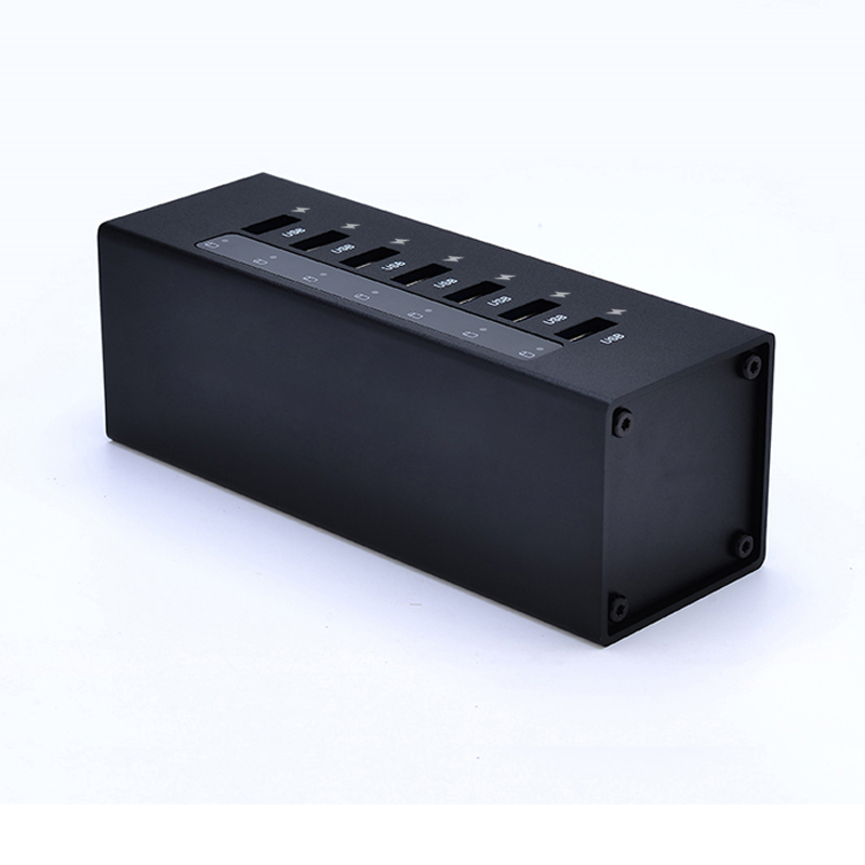
What Is the B-07A USB 3.0 HUB?
The B-07A is an industrial-style USB 3.0 hub designed to expand USB connectivity while providing features intended for more demanding installation environments.
The product description identifies several key characteristics:
- SuperSpeed USB 3.0
- USB 3.0 specification compliance
- Built-in USB 3.0 hub controller
- Metal enclosure
- Screw-lock support for USB connections
- Type-B upstream port
- Support for SuperSpeed, High-Speed, and Full-Speed operation
- Up to 900mA USB bus power per port
- LED status indicators for downstream ports
These features make the B-07A more than a basic consumer USB hub. Its metal enclosure and screw-lock connection design are particularly relevant when USB connections need additional mechanical security.
Key Features of the B-07A USB 3.0 HUB
SuperSpeed USB 3.0 Connectivity
The B-07A is designed around USB 3.0 SuperSpeed connectivity.
USB 3.0 provides a higher-performance data interface than earlier USB generations, making it useful for peripherals and storage devices that can take advantage of SuperSpeed operation.
The upstream Type-B port is specified to support:
- SuperSpeed
- High-Speed
- Full-Speed
This allows the hub to work with USB devices operating at different supported USB speeds.
Actual data-transfer performance depends on the connected device, USB cable, host computer, and other components in the connection.
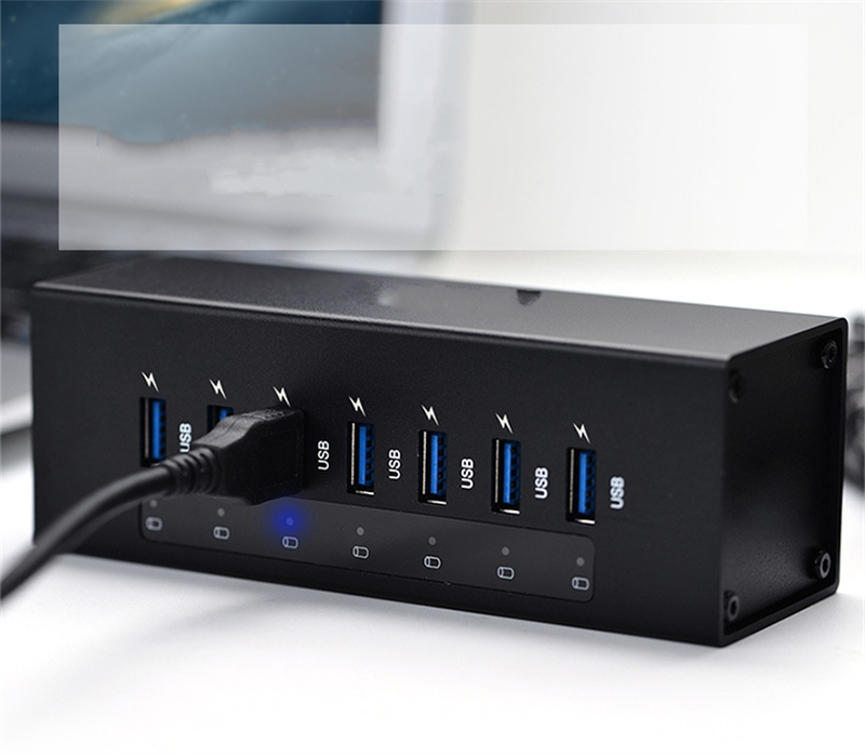
USB 3.0 Specification Revision 1.0 Compliance
The product description states that the B-07A is compliant with USB 3.0 Specification Revision 1.0.
Compliance with the stated USB specification provides a defined technical basis for the hub’s USB 3.0 functionality.
However, USB compliance does not mean that every connected device will operate at the maximum possible data rate. The performance of a complete USB connection depends on the capabilities of all connected components.
Industrial Metal Construction
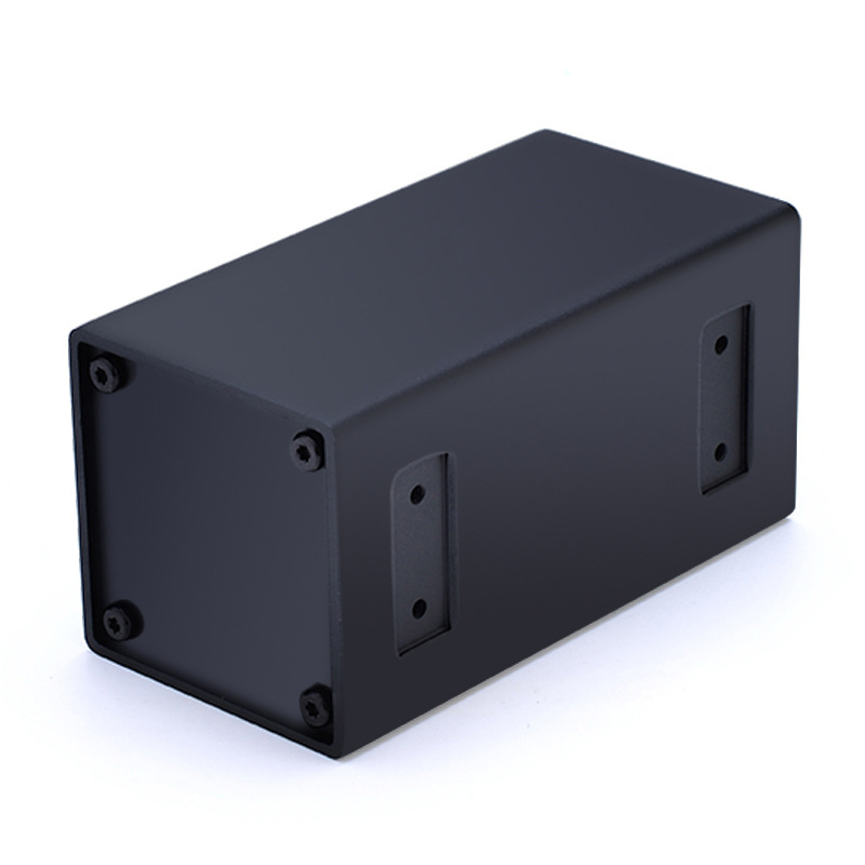
The B-07A features a metal case designed for critical applications.
A metal enclosure can provide a more robust physical housing than lightweight plastic designs, making this type of hub suitable for professional workstations and environments where equipment durability is important.
The supplied product information does not specify the exact metal material, dimensions, IP rating, operating temperature range, or environmental certifications. Those details should therefore not be assumed.
Screw-Lock USB Connections
One of the distinctive features of the B-07A is support for screw-lock features on both upstream and downstream USB ports.
USB connections can sometimes become loose when equipment is moved or when cables experience mechanical strain. Screw-lock support can help provide additional mechanical retention where compatible locking USB cables or connectors are used.
This feature can be particularly useful for fixed installations, industrial equipment, testing systems, and technical workstations.
The actual locking mechanism and required cable type should be confirmed before deployment.
900mA USB Bus Power Per Port
The supplied specifications state that the hub supports 900mA USB bus power for each port.
This is an important distinction from a general claim that the hub provides a particular wattage per port. The specification provided is a current figure, not a complete power-delivery specification.
At the USB 3.0 nominal bus voltage of 5V, 900mA corresponds to 4.5W as a simple electrical relationship:
5V × 0.9A = 4.5W
However, the supplied product information specifically states 900mA USB bus power and does not separately provide a guaranteed 5V output specification or total system power rating. Therefore, the 4.5W figure should be treated as an electrical calculation rather than an additional manufacturer-rated specification.
Actual power available to connected devices can depend on the hub’s design, host connection, device requirements, and system power conditions.
LED Downstream Port Status
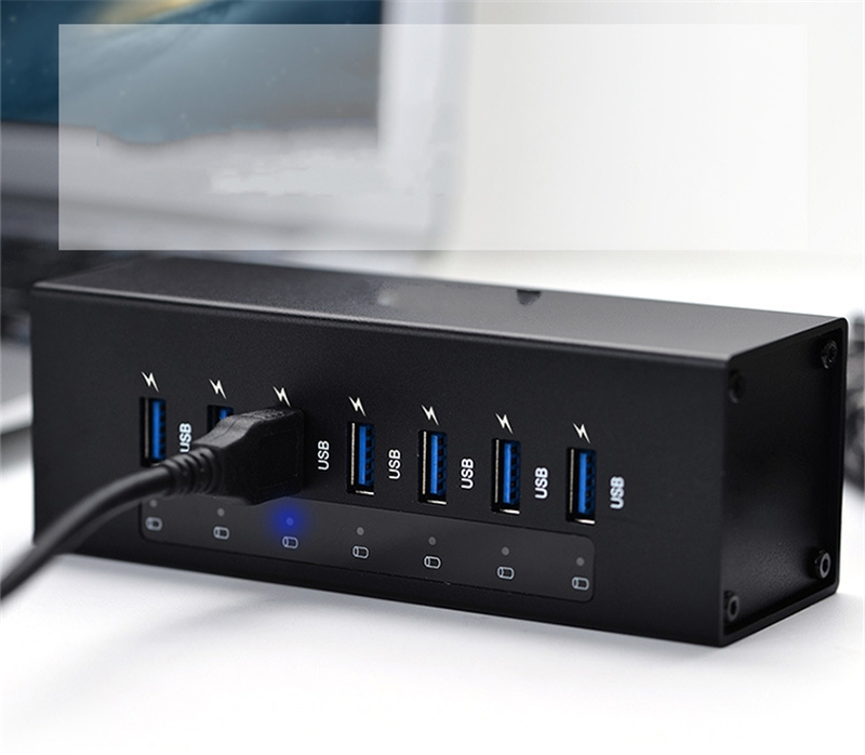
The B-07A supports LED indicators for downstream port status.
Status indicators can make a multi-device setup easier to monitor. When multiple USB devices are connected, visible port-status information can help users quickly identify active connections.
This can be useful for:
- IT workstations
- Testing environments
- Industrial systems
- Data-transfer stations
- Technical labs
- Device-management setups
B-07A Technical Specifications
| Specification | Details |
| Product | 7-Port USB 3.0 HUB |
| Model | B-07A |
| USB Standard | USB 3.0 |
| USB Specification | USB 3.0 Specification Revision 1.0 |
| Connectivity | SuperSpeed USB 3.0 |
| Upstream Port | One Type-B upstream port |
| Upstream Compatibility | SuperSpeed, High-Speed and Full-Speed |
| USB Bus Power | Up to 900mA per port |
| Enclosure | Metal case |
| Connection Security | Screw-lock support for upstream and downstream USB ports |
| Port Status | LED indicators |
| Controller | Built-in single-chip USB 3.0 hub controller |
| Product Categories | All Product, Data & Hub, USB 3.0 HUB |
| Tags | Powered USB 3.0 hub, USB Flash Drives |
Important: The supplied description contains a port-count inconsistency: the product is named a 7-Port USB 3.0 HUB, while another line states “Industrial 4-Port USB 3.0 Metal Hub.” Confirm the final physical port count before publishing.
Understanding the Upstream Type-B Port
The B-07A includes one upstream Type-B port.
The upstream connection is the link between the USB hub and the host computer or other compatible USB system.
The supplied specification states that this upstream port supports:
- SuperSpeed
- High-Speed
- Full-Speed
This allows the hub to communicate with the host using supported USB operating modes.
The Type-B connector is different from the downstream USB connectors commonly used for peripherals. Its role is to connect the hub itself to the host system.
A suitable USB cable is required to connect the hub’s upstream Type-B port to the host computer.
USB 3.0 SuperSpeed for Data Workflows
One of the main reasons to choose a USB 3.0 hub is the ability to work with SuperSpeed-compatible peripherals.
Potential devices include:
- USB flash drives
- External storage devices
- USB peripherals
- Data-transfer equipment
- Input devices
- Other compatible USB 3.0 accessories
The product’s USB Flash Drives tag also indicates relevance to flash-drive-related workflows, although the tag itself should not be treated as a specification for a dedicated flash-drive reader or specialized storage function.
When transferring data, the slowest component in the connection can limit overall performance.
For example:
Computer → USB cable → B-07A → USB cable → Storage device
If the storage device only supports an older USB standard, the connection will not operate at the full SuperSpeed capability simply because the hub supports USB 3.0.
Why the Metal Housing Matters
The B-07A’s metal case is one of its defining physical characteristics.
In professional environments, USB equipment may be installed in workstations, equipment areas, testing stations, or fixed technical setups where durability is more important than a lightweight consumer design.
A metal housing can provide a sturdy enclosure for the internal electronics and may be better suited to installations where the hub needs to remain securely positioned.
However, users should distinguish the supplied metal-case specification from environmental ratings. The product information does not state waterproofing, dust protection, shock certification, or a specific industrial temperature rating.
Screw-Lock Design for Secure Connections
Cable disconnection can be a problem in installations where equipment is frequently moved or where vibration and cable movement are present.
The B-07A supports screw-lock features for both upstream and downstream USB ports. When used with compatible locking connections, this can provide additional physical retention compared with standard friction-fit USB connectors.
Potential applications include:
- Industrial control workstations
- Technical equipment
- Test benches
- Data-transfer stations
- Fixed IT installations
- Professional device-management systems
Users should make sure that their USB cables and connectors are compatible with the hub’s screw-lock design.
Applications of the B-07A
Industrial Workstations
The combination of metal construction and screw-lock support makes the B-07A relevant to fixed or professional workstations where secure USB connectivity is important.
IT Departments
IT teams can use a multi-port USB hub to expand connectivity for computers that have limited available USB ports.
Data Transfer Stations
USB 3.0 SuperSpeed connectivity can support workflows involving compatible external storage and USB flash drives.
Testing Environments
Technical teams often connect multiple USB peripherals to a single computer. A centralized hub can simplify these connections.
Manufacturing and Equipment Systems
In fixed equipment installations, screw-lock support can help reduce accidental cable disconnection when compatible locking connections are used.
Professional Workstations
Design, engineering, technical, and service workstations may require multiple USB-connected peripherals. The B-07A provides centralized USB expansion in a more rugged physical design.
Benefits of an Industrial USB 3.0 Hub
Expanded Connectivity
A multi-port hub allows a host computer to connect to additional USB peripherals through a centralized device.
SuperSpeed Data Support
USB 3.0 SuperSpeed connectivity provides a higher-performance interface for compatible peripherals.
Durable Housing
The metal enclosure is designed with critical applications in mind.
Secure Cable Connections
Screw-lock support provides an additional connection-retention option when compatible cables are used.
Easy Port Monitoring
LED downstream-port status indicators can make active connections easier to monitor.
Broad USB Speed Support
The upstream Type-B port supports SuperSpeed, High-Speed, and Full-Speed operation according to the supplied specifications.
B-07A Compared With a Basic USB Hub
| Feature | B-07A Industrial USB 3.0 HUB | Basic USB Hub |
| USB 3.0 | Yes | Model dependent |
| SuperSpeed Support | Yes | Model dependent |
| Metal Enclosure | Yes | Often model dependent |
| Screw-Lock Support | Yes | Usually not specified |
| LED Port Status | Yes | Model dependent |
| 900mA Bus Power | Specified | Varies |
| Industrial-Oriented Design | Yes | Usually consumer-oriented |
| Type-B Upstream Port | Yes | Model dependent |
The B-07A is differentiated by its combination of USB 3.0 connectivity, metal construction, screw-lock support, and port-status indicators.
How to Set Up the B-07A
Step 1: Position the Hub
Place the B-07A in a suitable location near the host computer and connected USB equipment.
Step 2: Connect the Upstream Port
Use a compatible USB cable to connect the hub’s Type-B upstream port to the host computer.
Step 3: Connect USB Devices
Connect compatible downstream USB devices to the available hub ports.
Step 4: Secure Locking Connections
Where supported, use the screw-lock mechanism with compatible USB cables or connectors to improve physical connection security.
Step 5: Check LED Indicators
Observe the downstream port LEDs to monitor port status.
Step 6: Verify Device Recognition
Confirm that the host computer recognizes the connected USB devices and that they operate at their supported USB speed.
Best Practices for Using the B-07A
Use compatible USB 3.0 cables:
For SuperSpeed operation, use cables suitable for the required USB standard.
Secure fixed installations:
Take advantage of the screw-lock feature when compatible locking cables are being used.
Check device compatibility:
USB 3.0 support does not automatically make every connected device a SuperSpeed device.
Monitor connected devices:
LED indicators can help identify active downstream connections.
Avoid unsupported power assumptions:
The 900mA figure is the supplied bus-power specification per port. Do not assume that every connected device will draw or receive exactly 900mA.
Keep cable routing organized:
Good cable management helps reduce accidental strain on USB connectors.
What to Consider Before Buying
Confirm the Port Count
The most important clarification is the difference between the product name’s 7-Port designation and the supplied description’s 4-Port wording.
Check USB Requirements
Confirm that your devices can take advantage of USB 3.0 SuperSpeed if high-speed data transfer is important.
Check Cable Compatibility
If screw-lock connections are required, confirm that compatible cables and connectors are available for your installation.
Consider Power Requirements
The hub specifies up to 900mA USB bus power per port, but detailed total system power information was not supplied.
Evaluate Physical Installation
The metal housing and screw-lock design can be useful for fixed technical environments, but the exact mounting method and dimensions were not supplied.
Frequently Asked Questions
What is the B-07A?
The B-07A is identified as a 7-Port USB 3.0 HUB designed for SuperSpeed USB connectivity and professional applications.
Is the B-07A USB 3.0 compatible?
Yes. The supplied specifications identify it as a USB 3.0 hub compliant with USB 3.0 Specification Revision 1.0.
What type of upstream port does it use?
The B-07A has one Type-B upstream port supporting SuperSpeed, High-Speed, and Full-Speed operation.
Does the B-07A have a metal enclosure?
Yes. The product is specified with a metal case designed for critical applications.
Does it support screw-lock USB connections?
Yes. The supplied specifications state that screw-lock features are supported for both upstream and downstream USB ports.
How much USB bus power does each port support?
The supplied specification states up to 900mA USB bus power for each port.
Does the B-07A have LED indicators?
Yes. It supports LED indicators showing downstream port status.
Can it be used with USB flash drives?
The product is tagged for USB Flash Drives, and USB 3.0 connectivity can be useful with compatible flash drives. The actual performance depends on the flash drive and complete USB connection.
Is the B-07A suitable for industrial applications?
The product is described as an industrial USB 3.0 metal hub and includes features such as a metal case and screw-lock support that are relevant to professional and critical applications.
Is the product really 7-port or 4-port?
The supplied information contains a conflict: the product name says 7-Port USB 3.0 HUB, while the description includes “Industrial 4-Port USB 3.0 Metal Hub.” The manufacturer should confirm the correct physical port count.
Conclusion
The 7-Port USB 3.0 HUB B-07A is positioned as an industrial-oriented USB connectivity solution for professional and critical applications. Its combination of SuperSpeed USB 3.0, a metal case, screw-lock support, Type-B upstream connectivity, 900mA bus-power support per port, and LED port-status indicators makes it suitable for environments where reliable USB expansion and secure connections are important.
The hub can support workflows involving USB flash drives, data-transfer peripherals, testing equipment, industrial workstations, IT systems, and other compatible USB devices.
Its USB 3.0 architecture supports SuperSpeed, High-Speed, and Full-Speed operation through the upstream Type-B connection, while the screw-lock design provides an additional option for securing compatible USB connections in fixed installations.
One specification should be confirmed before the product is published or ordered: the product title identifies the unit as a 7-Port USB 3.0 HUB, while the supplied description also refers to an Industrial 4-Port USB 3.0 Metal Hub. Resolving this discrepancy will ensure the final listing accurately reflects the physical product.
Once the port-count detail is confirmed, the B-07A can be presented as a practical industrial USB 3.0 hub for high-speed connectivity, secure USB connections, and professional multi-device workflows.