Introduction
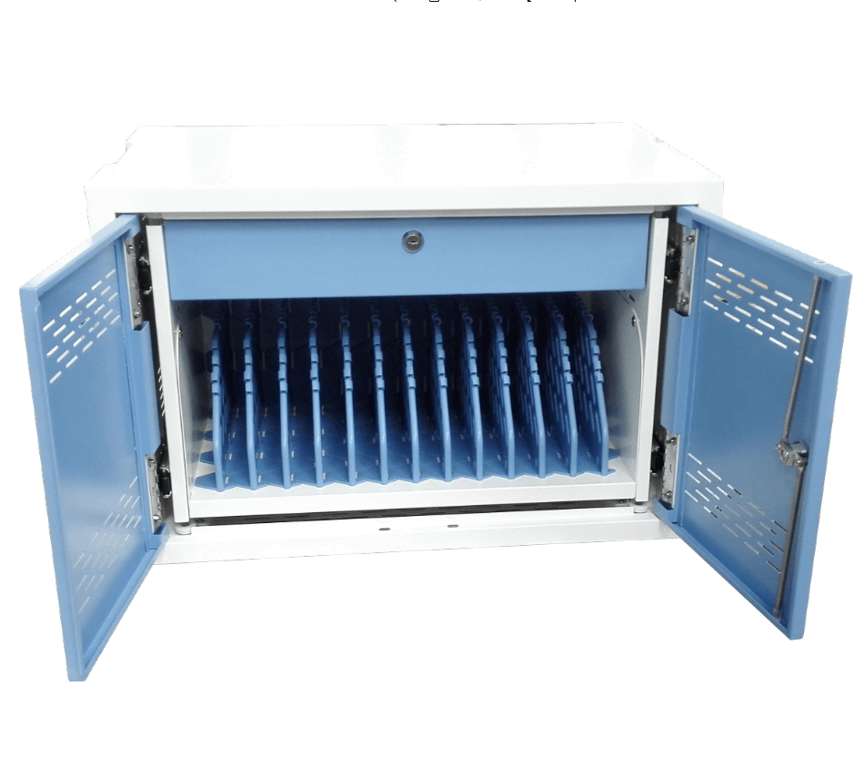
The 12-Device Charging Cabinet provides a centralized solution for organizations managing multiple devices.Loose power adapters, tangled cables, limited storage space, and unorganized equipment can make everyday device management more complicated, particularly in classrooms, offices, training facilities, and shared technology environments.
A dedicated 12-device charging cabinet provides a more organized approach by combining device storage with charging capability in one centralized cabinet.
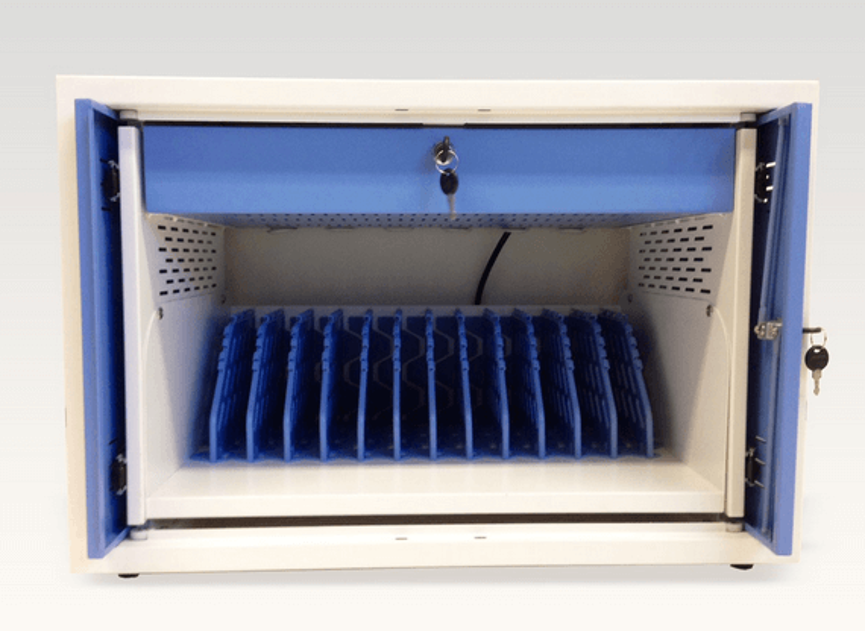
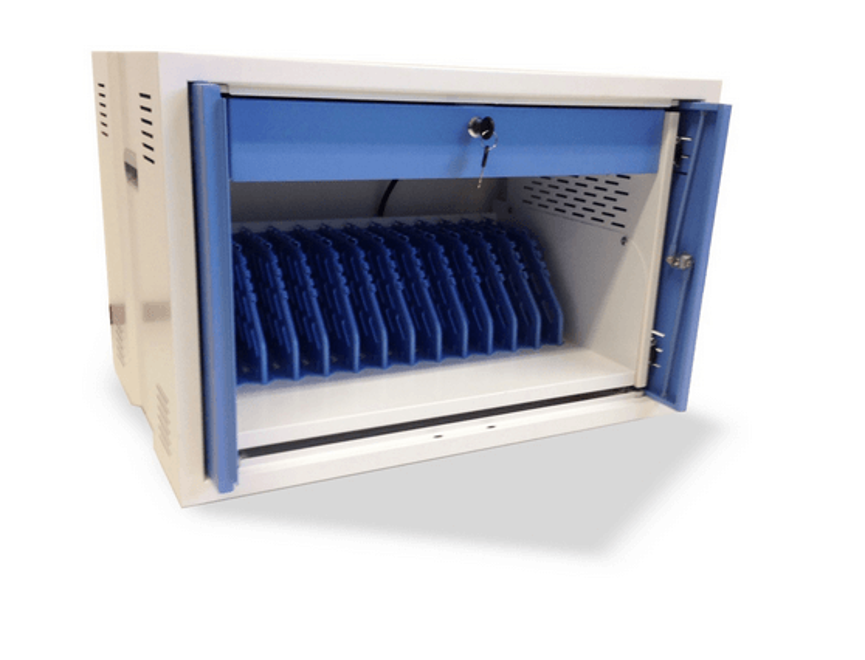
This charging cabinet is designed to charge and store up to 12 tablets, Chromebooks, and/or laptops. It also features cable management to help organize power connections, separate boxes for neatly storing power adapters, and a strong but lightweight steel construction.
Another important feature is its flexible installation design. The cabinet is wall-mountable and can also be stacked up to two units, giving organizations options for adapting their charging and storage capacity to the available space.
12-Device Charging Cabinet: Key Specifications
A charging cabinet is a dedicated storage solution designed to keep electronic devices organized while providing a central location for charging.
This particular model is designed for up to 12 tablets, Chromebooks, and/or laptops.
Rather than placing devices on shelves or desks with separate charging cables running across the workspace, a charging cabinet creates a dedicated area for device management.
It can help organizations establish a consistent workflow:
Store → Connect → Charge → Organize → Retrieve
This approach is especially useful when the same devices are shared among students, employees, staff members, or other users.
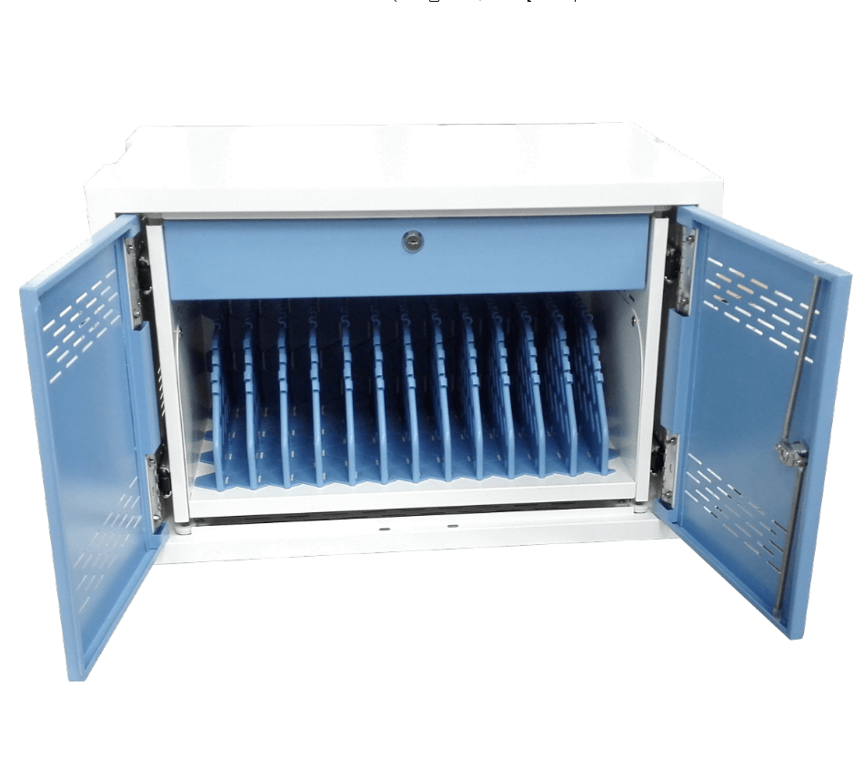
Key Specifications
| Specification | Details |
| Product Type | Charging Cabinet |
| Device Capacity | Up to 12 devices |
| Compatible Device Types | Tablets, Chromebooks and/or laptops |
| Storage | Integrated device storage |
| Charging | Designed for charging stored devices |
| Cable Management | Yes |
| Power Adapter Storage | Separate boxes |
| Installation | Wall-mountable |
| Stackable | Up to 2 units |
| Construction | Strong, lightweight steel |
| Main Purpose | Device charging and storage |
The supplied specifications do not state the exact charging connectors, power output, charging protocol, or electrical specifications, so these details should be confirmed with the manufacturer for a particular installation.
Charge and Store Up to 12 Devices
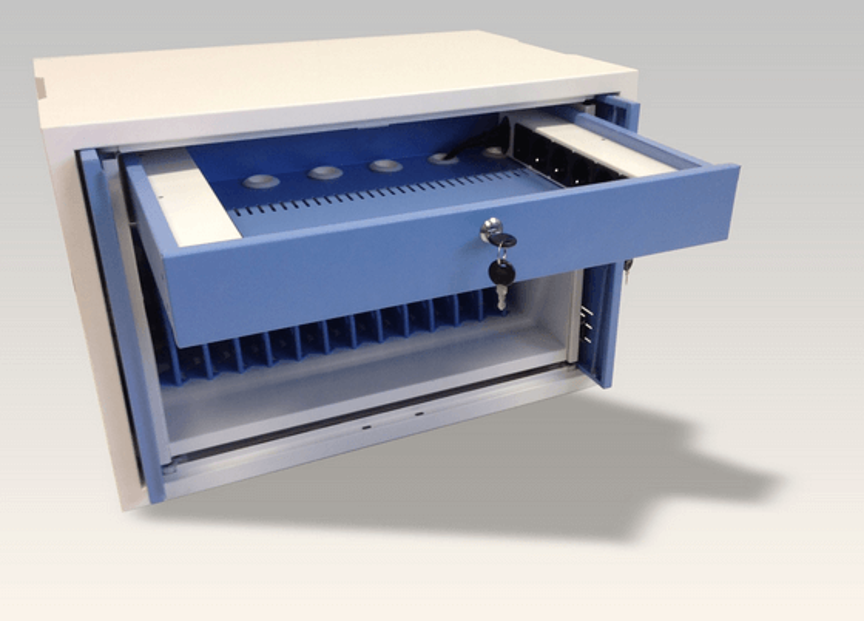
The main purpose of the cabinet is to provide a centralized location for up to 12 devices.
This capacity makes it suitable for environments where multiple electronic devices are regularly shared or managed.
Instead of storing tablets, Chromebooks, or laptops across different locations, staff can place them in the cabinet after use.
The cabinet can then serve as a dedicated charging area, helping create a more consistent routine for device storage.
Examples of Supported Device Types
The cabinet is designed for:
- Tablets
- Chromebooks
- Laptops
- Other suitable devices that fit within the cabinet’s storage spaces
Because laptop and Chromebook dimensions can vary considerably, users should confirm the physical dimensions of their devices before purchasing.
Charging and Storage in One Solution
One of the biggest benefits of a charging cabinet is the combination of storage and charging.
A conventional shelf provides storage but does not necessarily organize charging. A charging area provides power but may not provide secure, dedicated storage.
A charging cabinet brings these functions together.
This can be particularly useful at the end of a class, work session, training session, or shared-device activity.
Users can return devices to the cabinet, connect the appropriate charging cables, and leave them in one organized location.
Cable Management for Better Organization
Cable management is one of the most important features of a multi-device charging environment.
When 12 devices are connected to individual power adapters, cables can easily become tangled or difficult to identify.
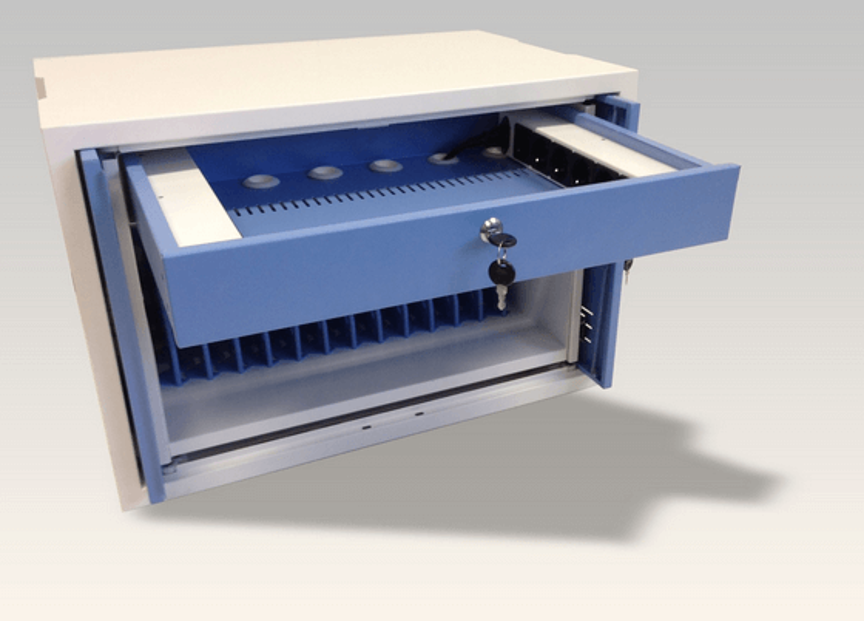
The cabinet’s cable management system is designed to help organize the power supply and prevent a tangle of cables.
This can make it easier for staff to:
- Identify charging cables
- Connect devices
- Disconnect devices
- Maintain an organized cabinet
- Reduce cable clutter
- Prepare devices for their next use
A well-organized cable system can also make routine device management faster and more convenient.
Separate Boxes for Power Adapters
The cabinet includes separate boxes for organizing power adapters neatly.
This is especially useful because device charging systems can involve multiple adapters.
Without dedicated adapter storage, power bricks may be placed loosely inside the cabinet or left outside with the devices. Separate storage areas provide a more structured way to manage them.
Benefits of Dedicated Adapter Storage
| Benefit | Result |
| Separate adapter compartments | Better organization |
| Reduced loose equipment | Cleaner storage area |
| Easier identification | Faster device setup |
| Improved cable arrangement | Less clutter |
| Centralized storage | Easier management |
The exact dimensions of the adapter boxes were not provided, so adapter compatibility should be checked before installation.
Strong but Lightweight Steel Construction
The cabinet is made from strong but lightweight steel.
Steel construction can provide a suitable balance between structural strength and manageable weight.
For a cabinet intended to hold multiple electronic devices, a sturdy structure is important because the unit needs to support repeated daily use.
At the same time, a lightweight construction can make installation and handling more manageable compared with a substantially heavier storage cabinet.
The actual weight, steel thickness, finish, and load rating were not supplied, so those specifications should be confirmed if they are important for a particular installation.
Wall-Mountable Design
The cabinet can be wall-mounted, giving organizations another option for using available space.
Wall mounting can be particularly useful in environments where floor and desk space are limited.
For example, a classroom may already have desks, chairs, storage cabinets, and computer equipment occupying much of the available floor area.
A wall-mounted charging cabinet can help move device storage away from desks and floors.
Potential Wall-Mount Applications
- Classrooms
- Computer labs
- Training rooms
- Offices
- Meeting rooms
- Educational facilities
- Shared-device workspaces
Before wall mounting, users should verify the wall structure, mounting hardware, cabinet weight, and the combined weight of the stored devices.
Stackable Design for Two Units
Another useful feature is the cabinet’s stackable design, which allows two units to be stacked.
This provides organizations with an option to increase their device storage capacity without necessarily expanding the footprint across an entire room.
If each unit accommodates 12 devices, two units provide storage space for up to:
12 + 12 = 24 devices
This is a mathematical capacity based on the stated 12-device capacity per cabinet. Actual installation should follow the manufacturer’s stacking instructions and safety requirements.
One Cabinet vs. Two Cabinets
| Configuration | Stated Capacity |
| 1 cabinet | Up to 12 devices |
| 2 stacked cabinets | Up to 24 devices |
The exact stacking hardware and installation requirements were not provided, so the manufacturer’s instructions should be followed when configuring two units.
Benefits of a Charging Cabinet
1. Centralized Device Storage
All supported devices can be returned to one designated location.
2. Charging Organization
Charging connections can be managed within the cabinet instead of being distributed around the room.
3. Cable Management
The built-in cable organization helps reduce tangles and clutter.
4. Adapter Organization
Separate boxes provide dedicated locations for power adapters.
5. Space Flexibility
The wall-mountable design provides an alternative to floor or desk storage.
6. Expandable Capacity
Two units can be stacked according to the supplied product specification.
7. Durable Construction
The strong steel design is intended for a practical device-storage environment while remaining relatively lightweight.
Ideal Applications
The 12-device charging cabinet can be useful in many environments where multiple mobile computing devices are shared.
Schools and Classrooms
Schools increasingly use tablets and Chromebooks as part of digital learning.
A centralized cabinet can provide a dedicated location for devices between lessons.
A simple classroom routine can be:
Students Use Devices → Devices Returned → Devices Connected → Devices Charged → Devices Stored
This can reduce the need for teachers to search for devices or chargers before the next lesson.
Computer Labs
Computer labs and technology rooms may have multiple portable devices that need to be stored after use.
The cabinet can provide a dedicated charging and storage area.
Training Centers
Training organizations may provide laptops or tablets to participants. Centralized storage can help staff manage devices between sessions.
Offices
Companies that maintain shared tablets or laptops can use a charging cabinet as a central device-management point.
Conference and Meeting Rooms
Shared devices used for presentations, registration, or meetings can be returned to a dedicated charging location after use.
Repair and Service Environments
Organizations managing multiple devices can use centralized storage to keep equipment organized while charging.
Charging Cabinet vs. Traditional Storage Shelf
A conventional storage shelf can hold devices, but it may not provide the same level of charging and cable organization.
| Feature | Charging Cabinet | Traditional Shelf |
| Device Storage | Yes | Yes |
| Designed for Charging | Yes | Usually no |
| Cable Management | Yes | Usually no |
| Adapter Organization | Separate boxes | Varies |
| Wall Mounting | Yes | Varies |
| Stackable | Up to 2 units | Depends |
| Device Management | Centralized | Basic |
| Charging Workflow | Organized | Usually requires separate setup |
The charging cabinet is therefore more appropriate when an organization needs both storage and charging rather than storage alone.
Creating an Organized Device Management System
A charging cabinet works best when combined with a simple device-management routine.
Step 1: Assign Devices
Give each device a designated storage position.
Step 2: Label Equipment
Where appropriate, label devices and corresponding charging cables.
Step 3: Connect Devices After Use
Return devices to the cabinet and connect the appropriate charging cable.
Step 4: Organize Cables
Use the cabinet’s cable-management system to keep connections orderly.
Step 5: Store Adapters Properly
Place power adapters in their designated separate boxes.
Step 6: Prepare for the Next Session
Before the next class, meeting, or work session, staff can retrieve the required devices from the same central location.
This simple routine can make shared-device management more predictable.
How Cable Management Improves Daily Use
Cable tangles are more than an aesthetic problem. They can make it difficult to determine which cable belongs to which device and can slow down the process of connecting or disconnecting equipment.
The cabinet’s cable-management design addresses this problem by providing a more structured charging environment.
For organizations managing 12 devices, this can be especially helpful because multiple charging cables are present in the same cabinet.
Good cable management can support:
- Faster device connection
- Easier troubleshooting
- Cleaner storage
- Better equipment identification
- Reduced workspace clutter
Space-Saving Advantages
The combination of wall mounting and two-unit stacking provides flexibility for different room layouts.
A school with limited floor space may prefer wall mounting.
An organization with an appropriate floor or equipment area may instead use the stackable configuration.
The best option depends on the available space and the manufacturer’s installation requirements.
Choosing the Right Charging Cabinet
Before purchasing a charging cabinet, organizations should evaluate several factors.
Device Size
Tablets, Chromebooks, and laptops come in different sizes. Verify that the devices physically fit into the cabinet.
Device Quantity
Determine whether 12 storage positions are sufficient or whether two units are needed.
Charging Requirements
Confirm that the cabinet supports the required charging adapters, connectors, and power configuration.
Installation Method
Decide whether wall mounting or stacking is more suitable for the available space.
Cable Organization
Consider how many cables and adapters will need to be stored and managed.
Construction
A strong steel structure can be useful for environments where the cabinet will be used frequently.
Important Installation Considerations
Before installing the cabinet, users should consider:
- Wall strength for wall-mounted installations
- Mounting hardware
- Cabinet dimensions
- Device dimensions
- Adapter dimensions
- Available electrical power
- Cable routing
- Ventilation requirements
- Safe access for users
The exact electrical and physical specifications should be confirmed with the manufacturer before installation.
Frequently Asked Questions
How many devices can the charging cabinet hold?
The cabinet is designed to charge and store up to 12 tablets, Chromebooks, and/or laptops.
Can two cabinets be stacked?
Yes. The supplied specification states that the cabinet is stackable up to two units.
How many devices can two stacked cabinets hold?
Based on the stated 12-device capacity per unit, two cabinets can accommodate up to 24 devices.
Can the cabinet be mounted on a wall?
Yes. The cabinet is specified as wall-mountable.
What types of devices can it store?
It is designed for tablets, Chromebooks, and/or laptops. Exact device dimensions should be checked before purchase.
Does the cabinet provide cable management?
Yes. It includes cable management intended to organize the power supply and help prevent cable tangling.
Does it have dedicated power-adapter storage?
Yes. The cabinet includes separate boxes for organizing power adapters neatly.
What is the cabinet made from?
The product is described as having a strong but lightweight steel design.
Is the cabinet itself a charger?
It is described as a charging cabinet designed for charging and storing devices. However, the supplied specifications do not state the exact charger type, connector configuration, voltage, current, or total power output.
Is this charging cabinet suitable for schools?
Yes. Its 12-device capacity, cable management, storage, and wall-mountable/stackable design can make it suitable for classrooms, computer labs, and educational environments.
Conclusion
The 12-Device Charging Cabinet provides a centralized solution for organizations that need to store and charge tablets, Chromebooks, and laptops in an organized environment.
Its combination of 12-device capacity, cable management, separate power-adapter storage, wall-mountable construction, two-unit stackability, and strong but lightweight steel design makes it a practical option for classrooms, offices, training centers, computer labs, and shared-device environments.
The cabinet can help transform a collection of individual devices and charging cables into a more structured device-management system. With one unit supporting up to 12 devices, organizations can also use two stackable units where additional capacity is required, providing a potential storage capacity of up to 24 devices.
Before purchasing, users should confirm the physical dimensions of their devices, charging connector requirements, electrical specifications, adapter sizes, and installation requirements.
For organizations seeking a dedicated charging and storage solution for multiple tablets, Chromebooks, and laptops, this charging cabinet offers a practical way to keep devices, cables, and power adapters organized in one centralized location.